Set up tuition payments with Stripe
The Payments card reads Stripe is connected. Payments are on. and offers Set up family billing. From then on you set up each family's tuition in Business › Billing, and Stripe takes the payments.
On this page
You're ready to stop chasing tuition checks and let families pay by card or bank account. The Center Book bills each family, and Stripe, a payment company, moves the money into your bank. Here's how to connect the two.
Steps
Turn on billing
Go to Settings › General and choose Set Up. Scroll to Payments.
Make sure Bill families in The Center Book is checked. It saves the moment you click it.
Note: If your center bills families some other way, uncheck Bill families in The Center Book. The Stripe card disappears, and Business › Billing reads "This center bills families outside The Center Book."
Connect Stripe
The card shows two buttons. Choose the one that fits.
- If your center already has a Stripe account, select I already have a Stripe account. Stripe's sign-in opens in a small window. Sign in, choose the account, and approve connecting it to The Center Book. The window says Stripe connected and closes on its own, and the card shows "Stripe connected."
- If you don't have one, select I need a Stripe account. Stripe's setup opens right inside the card. Follow its steps to create your account and enter your business and bank details.
Note: If the card shows only I need a Stripe account, connecting an existing account isn't available for your center yet. Contact The Center Book support team if you'd rather use the account you have.
Tip: An owner with more than one center can connect the same Stripe account to each of them. Connect it from each center's own Payments card.
Finish Stripe's setup
Stripe has to approve your details before it takes payments. The line under Payments tells you where you are:
- "Stripe needs your business details before you can take payments." or a line like "Stripe needs 2 more things before you can take payments." Select Finish Stripe setup and complete what Stripe asks for. For an account you connected with I already have a Stripe account, this opens your Stripe dashboard in a new tab: sign in, follow its steps, then come back.
- "Stripe is reviewing your details. This usually takes a few minutes." Nothing to do. Come back later; the card checks with Stripe each time you open it.
- "Stripe is connected. Payments are on." You're done with Stripe.
Important: The Center Book can bill a family by card or by bank account. When you create a new Stripe account here, bank payments are turned on for you. If you connected an account you already had, check in your Stripe dashboard that ACH Direct Debit payments are turned on before your first family chooses to pay by bank.
Enter your tuition
On the same Set Up page, find the Tuition card and select Edit.
Fill in your prices: Placement Testing & Orientation, Monthly Tuition (Math & Reading) (one box for a student's first subject and one for their second), Registration Fee (one-time), Supply Fee (one-time), Credit Card Fee (per subject) and Returned Check Fee (NSF). Leave any you don't charge empty.
Select Save.
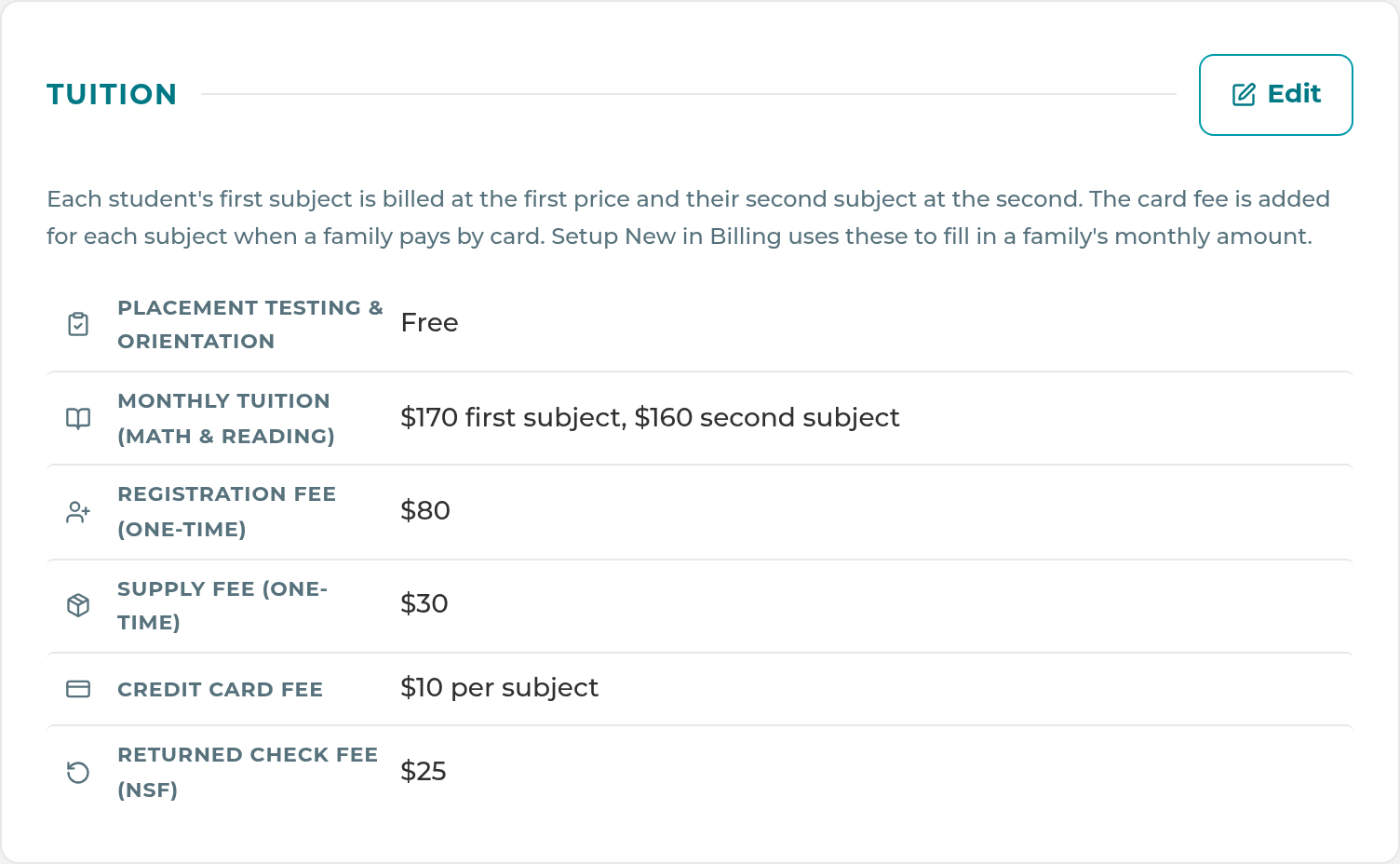
Each student's first subject is billed at the first price and their second subject at the second. The card fee is added for each subject when a family pays by card.
What happens next
Once Stripe says payments are on, the Payments card shows Set up family billing. It takes you to Business › Billing › Setup New, where you set up each family's monthly tuition. The amounts fill in from your Tuition card. Open your Stripe dashboard on the card takes you to your account in Stripe.
If your center already billed families in Stripe before connecting, The Center Book brings in your existing customers, autopays and the last 12 months of payments right after you connect, so nobody has to enter them again. It never charges anyone or changes a payment; the only thing it adds in Stripe is a note linking each matched customer to your center. To run it again, go to Business › Billing › Setup New and select Bring in existing Stripe billing. Any Stripe customer it can't match to exactly one family is listed under Needs matching for you to pick the family, or to mark Not a Center Book family.
Note: Disconnect Stripe on the Payments card stops billing in The Center Book until you connect again. Your Stripe account, and any autopay already set up in it, stay with you.
If something goes wrong
"Payments are not set up for The Center Book yet." Payments haven't been turned on for your center. Contact The Center Book support team.
"Your browser blocked the Stripe sign-in window. Allow pop-ups for this site and try again." Allow pop-ups for The Center Book in your browser's settings, then select I already have a Stripe account again.
"Stripe was not connected. You can try again." The Stripe window was closed or cancelled before you approved. Start again.
"This sign-in link has expired or is not valid. Start again from Settings." The Stripe window was open more than 10 minutes. Start again from the Payments card.
"That Stripe account is in a different mode (test or live) from The Center Book. Nothing was connected." You signed in to a Stripe test account. Sign in to your live account instead.
"This center is already connected to a Stripe account that takes payments. Contact support to change it." Your center already has a working Stripe account. To switch accounts, contact The Center Book support team.
"Payments are almost ready. Please try again later, or contact support." Your center's setup on our side isn't finished. Try again later, or contact support.
Business › Billing says "Billing isn't set up for this center yet." Stripe isn't taking payments yet. Select Set up payments in Settings › General › Set Up and finish the steps above.
You don't see the Payments section. Only owners and managers see it. If you don't see the Tuition card, your role needs Billing turned on under Business in Settings › Permissions.
"Stripe was disconnected from The Center Book. Billing is paused until you reconnect." Someone disconnected the account, here or in Stripe. Connect it again from the Payments card.
Related
Last updated October 25, 2026