A parent didn't get a text
You know whether the text was sent, why it didn't arrive, and what to change so the next one does.
On this page
A parent at the front desk says they never got the pickup text, or the progress meeting invitation. Start with what the app recorded, then check your center's settings, then the parent's record.
Steps
See what the app recorded
- Open Inbox, choose Parent texts, and open the parent's conversation. You can also select Text at the top of the parent's profile.
- Find the text. Automatic texts, such as pickup reminders, show here too. If it reads Not delivered with a time under it, the text was sent but the phone company couldn't deliver it. Go to step 3. If the text isn't in the conversation at all, it was never sent. Go to "Check your center".
- Check the parent's phone number with them, and fix it on their profile. Until it's fixed, reach them another way, such as a call from the office phone.
Not delivered also shows in two other places:
- On Attendance, on the student's card, for the automatic pickup text and the "We Missed You" text.
- On the student's profile, in the Progress Meeting section, beside "Invite text last sent" or "Reminder text last sent".
Check your center
- Outbound texts is off. Go to Settings › Parent Communication and choose Text. If Outbound texts reads Sending is OFF, no text goes to any parent, automatic or typed. An owner or manager can flip it to Sending is ON.
- That message is switched off. Automatic texts each have their own switch on the same page, such as Send the automatic pickup reminder, Send progress meeting invites automatically and Send the birthday text. A text that was due while its switch was off is never sent later. See Choose which messages families get.
- Your texting number isn't connected. Every text stops. A "We Missed You" text says "This center has no texting number set up, so the text wasn't sent." Contact The Center Book support team.
Check the parent
- Open the parent's profile. If the Text button at the top is grayed out, the reason shows beside it.
- "No mobile number on file": there's no phone number on their record. Add it.
- Their consent isn't Text on. Find the Communication Preferences card. CURRENT STATUS must read Text on. No reply means they haven't agreed yet. Opted out means they said no. If SOURCE reads Replied STOP, they texted STOP, and only they can turn texts back on, by texting START. Otherwise, ask the parent, then select Edit and record their answer.
- The Text messages box is off. Under Receives on the same card, Text messages must be on for the progress meeting invitation, the birthday text and the automatic pickup text. A text you type yourself doesn't check this box.
- For a pickup text: the automatic text goes only to the adult picked under Pickup contact today at check-in, and only while the visit is still open. See Check a student out at pickup.
Make sure someone hears about the next one
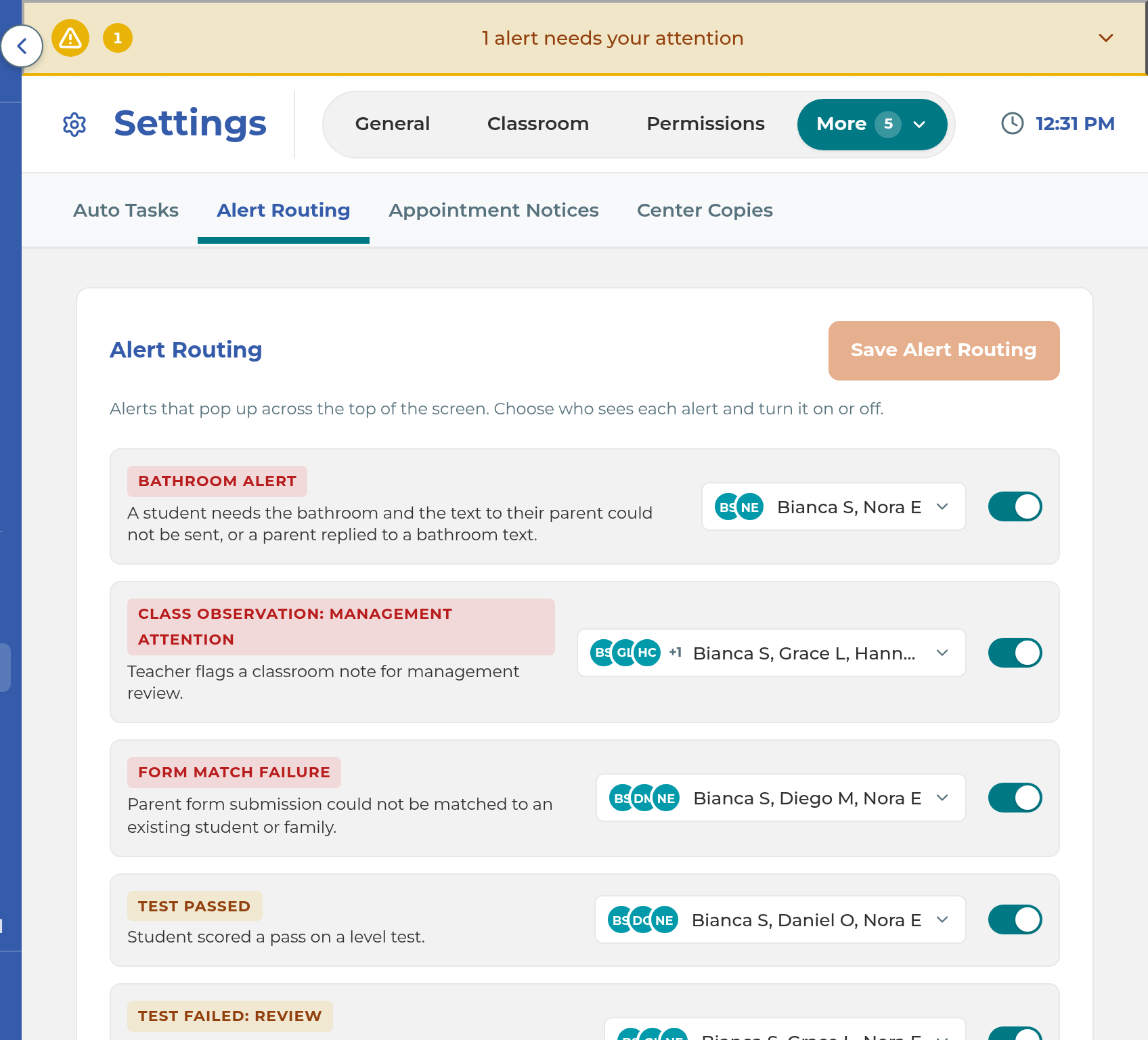
Go to Settings › Staff Automations and choose Alert Routing.
On the TEXT NOT DELIVERED row, pick the staff who should be told, and switch the row on. Select Save Alert Routing.
What happens next
When a text can't be delivered, the staff on the TEXT NOT DELIVERED row get a red alert: "We could not deliver a text to (parent) on (number). They have NOT received it. Please check the number with the family, or reach them another way." While nobody is picked on that row, the staff on the EMAIL GAVE UP row get it instead. If nobody is picked on either row, nobody is told.
A text that was never sent, because a switch was off or the parent has no consent, doesn't raise a TEXT NOT DELIVERED alert. Also: while Send progress meeting invites automatically is off, owners and managers get a Family messages not sent alert each day.
Important: When a text you type can't go out because of your texting number or the phone company, the message under it reads "Failed to send: The text couldn't be sent right now" and asks you to try again in a few minutes. Trying again won't help. Refresh the conversation: if the text then reads Not delivered, check the parent's number. If it happens for every parent, contact The Center Book support team.
If something goes wrong
"Texting is turned off for this center, so the text wasn't sent. Let a manager know." Outbound texts is off. Ask an owner or manager to turn it on.
"Cannot send: parent has not opted in to texts." The parent's CURRENT STATUS isn't Text on. Ask them, then record their answer in Communication Preferences.
A "We Missed You" text says "(Parent) has turned off this center's texts by replying STOP": the phone company is refusing texts to them. They can text START to get texts again.
A "We Missed You" text says "The phone number on file for (parent) can't receive texts.": the number is wrong or can't take texts. Check it with the family.
A Pickup texts may have stopped alert. The automatic pickup texts haven't run for a while during class, so parents may not be getting them. Text or call waiting families yourself, and contact The Center Book support team.
You don't see Parent texts in the Inbox. You aren't picked on the PARENT TEXTS row in Alert Routing. Ask a manager to add you.
Related
Last updated October 26, 2026